
Fixing error "ERROR HttpTinyClient:74 - URI [http://activemq:nullnull/read/org.apache.activemq:type"
- Sebastian Koch
Owned by Sebastian Koch
Problem
Locations are not showing up properly in the Azeti Control Panel and you see exceptions similar to the below one.
Error message
 2016-08-17 11:55:25 652 ERROR HttpTinyClient:74 - URI [http://activemq:nullnull/read/org.apache.activemq:type=Broker,brokerName=activemq,connector=clientConnectors,connectorName=mqtt,connectionViewType=clientId,connectionName=cloudConnector_neu-sc13-vagrant-sebastian] Exception [I/O error on GET request for "http://activemq:nullnull/read/org.apache.activemq:type=Broker,brokerName=activemq,connector=clientConnectors,connectorName=mqtt,connectionViewType=clientId,connectionName=cloudConnector_neu-sc13-vagrant-sebastian": For input string: "nullnull"; nested exception is java.net.MalformedURLException: For input string: "nullnull"] Method [GET] Request [] Cause [{}]
java.lang.NumberFormatException: For input string: "nullnull"
at java.lang.NumberFormatException.forInputString(NumberFormatException.java:65)
Solution
Some crucial system parameters are missing, to allow the M2M_Processor to figure out the remote ip address of a connected Site Controller.
- Log in to your Organization in the azeti Control Panel as Super Admin
- Go to System Parameters and search for
msgbus., now check if the below listed parameters exist and create the missing ones. - Click Add and create all of the missing parameters, as listed in the table below
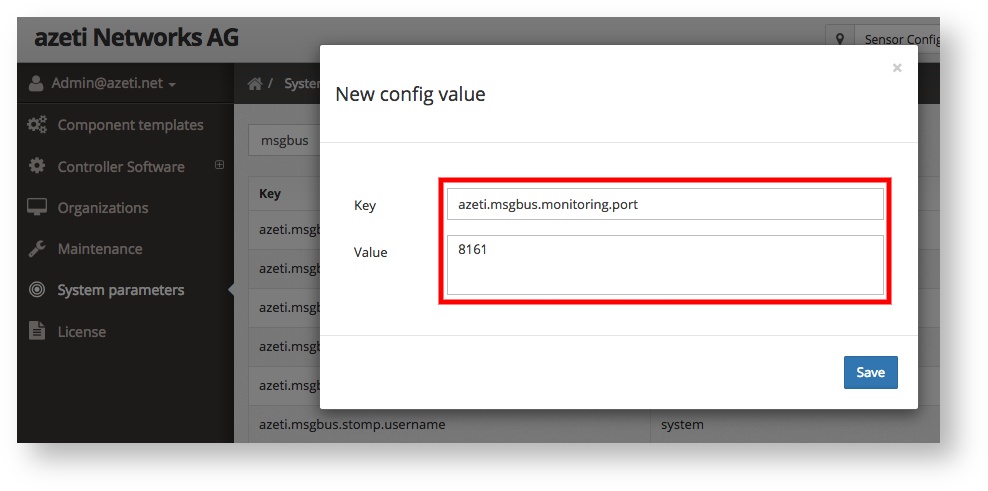
| Key | Value |
|---|---|
azeti.msgbus.monitoring.port | 8161 |
azeti.msgbus.monitoring.path | /api/jolokia |
azeti.msgbus.monitoring.password | admin |
azeti.msgbus.monitoring.username | admin |
azeti.msgbus.clientprefixes | cloudConnector_,data_store_ |
Related articles
Filter by label
There are no items with the selected labels at this time.